
Casa Mobile Key, YubiKey, and Casa Key: Where Each One Comes From
Every key in a multisig vault started as a number nobody should be able to guess through utilizing various sources of entropy. In any multisig vault, regardless of vendor, it’s important to understand how each of those keys are derived to maximize the security benefits of a multi-key multi-vendor wallet.
When you build a Casa multisignature vault, you must choose which keys to use to secure it. Casa's default recommendation is a 3-key vault holding a Mobile Key, a hardware wallet key, and the Casa Key. You can always change what keys sign your vault and fill those slots with hardware wallets from vendors like Trezor and Ledger or with YubiKeys instead. The Casa key is a single recovery key held by Casa and must be included in any multi-signature Casa vault setup. With the recent discussions around entropy of keys, we want to share with our clients how the Casa Mobile Key, YubiKey, and Casa Key are generated and secured.
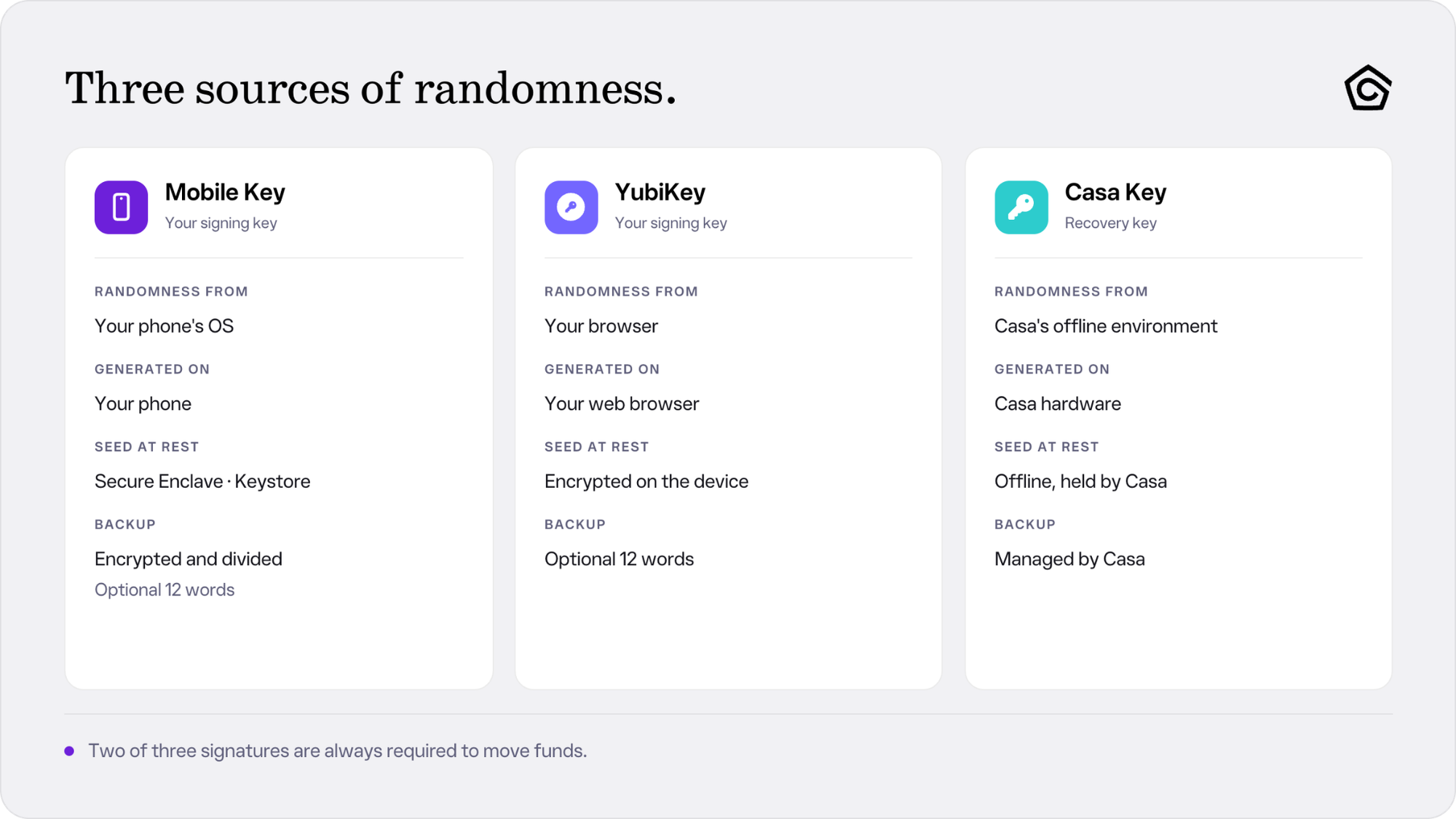
Casa has built the software that generates the seeds behind those three keys. That software runs in three different places: your phone for the Mobile Key, your browser for the YubiKey key, and Casa's offline environment for the Recovery Key. Each draws on its own source of randomness.
Casa Mobile Key
Most Casa clients use the Mobile Key more than any other key in their vault. In a default 3-key setup it acts as one of your two signing keys, paired with a hardware wallet or a YubiKey. Having a Mobile Key is not mandatory, and some Casa clients choose to run a 3-key vault with two hardware devices instead.
The Mobile Key's advantage shows up in inheritance, which every paid plan includes. When sharing keys with your inheritor, you can export the Mobile Key as an encrypted QR code and give a copy to a recipient without having them interact with or store an unfamiliar hardware device after they create a free Casa account.
How your Mobile Key seed is generated
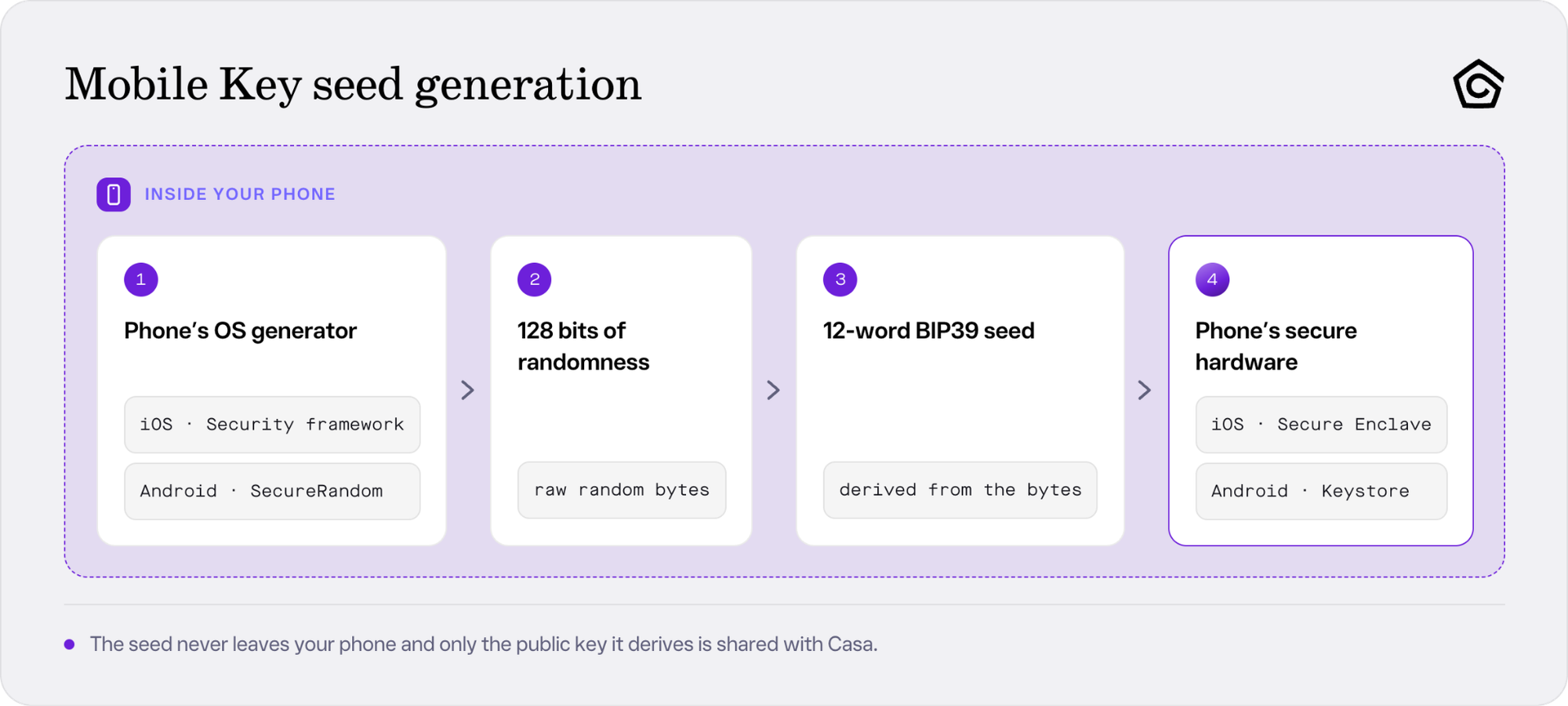
Casa's app code runs on your device to generate the seed of your Mobile Key.
The app requests 128 bits of randomness from the operating system's cryptographic generator, going through Apple's Security framework on iPhone and Java's SecureRandom on Android. Those bytes become a 12-word BIP39 recovery phrase, and Casa's servers never see the plaintext seed.
These are the same generators the operating system relies on for its own cryptography, including the keys behind every encrypted connection your phone makes. Apple and Google audit these generators, not Casa. Casa does not seed them, mix in a second source, or substitute an algorithm of its own.
From there, the app adds the standard BIP39 checksum and derives your vault key through BIP32. That derivation is deterministic, which is what lets the same seed phrase rebuild the same keys, and it does not shrink the randomness the phrase started with.
How your Mobile Key seed is protected at rest
Once the seed for your Mobile Key is generated, the app hands it to the phone's own secure key storage rather than writing it to a file of its own.
On iPhone, that storage is the iOS Keychain, protected by the Secure Enclave. Casa sets an access policy on the item that requires user presence, and pins it to that single device under a setting that only holds while a passcode is set. That Keychain copy stays on that phone and cannot be restored onto a different device.
On Android the app encrypts the seed with a key held in the Android Keystore and writes the result into the app's private storage, where operating-system permissions keep other applications out. What sits on your phone is ciphertext, and the seed will never be written in readable form.
Using the Mobile Key reverses that flow. When you sign on an iPhone, the app asks the Keychain to release the seed, and iOS verifies user presence first through Face ID, Touch ID, or your device passcode. Casa does not cache that authorization, so the check runs on every retrieval rather than once per session.
A Mobile Key signature is also one signature out of the two your vault requires, which is the reason for building a vault from separate keys on separate hardware.
How your Mobile Key backup works
At the moment of seed generation, the app creates a long random secret. That secret’s only job is encrypting the seed for backup. The app sends the secret to Casa over HTTPS, and Casa stores it encrypted using a key management service backed by hardware security modules. The app then encrypts your seed with that secret, writes the result to your iCloud or Google Drive account, and deletes the secret from your phone.
Your cloud account holds an encrypted blob and no way to decrypt it, while Casa holds a decryption secret and no copy to decrypt.
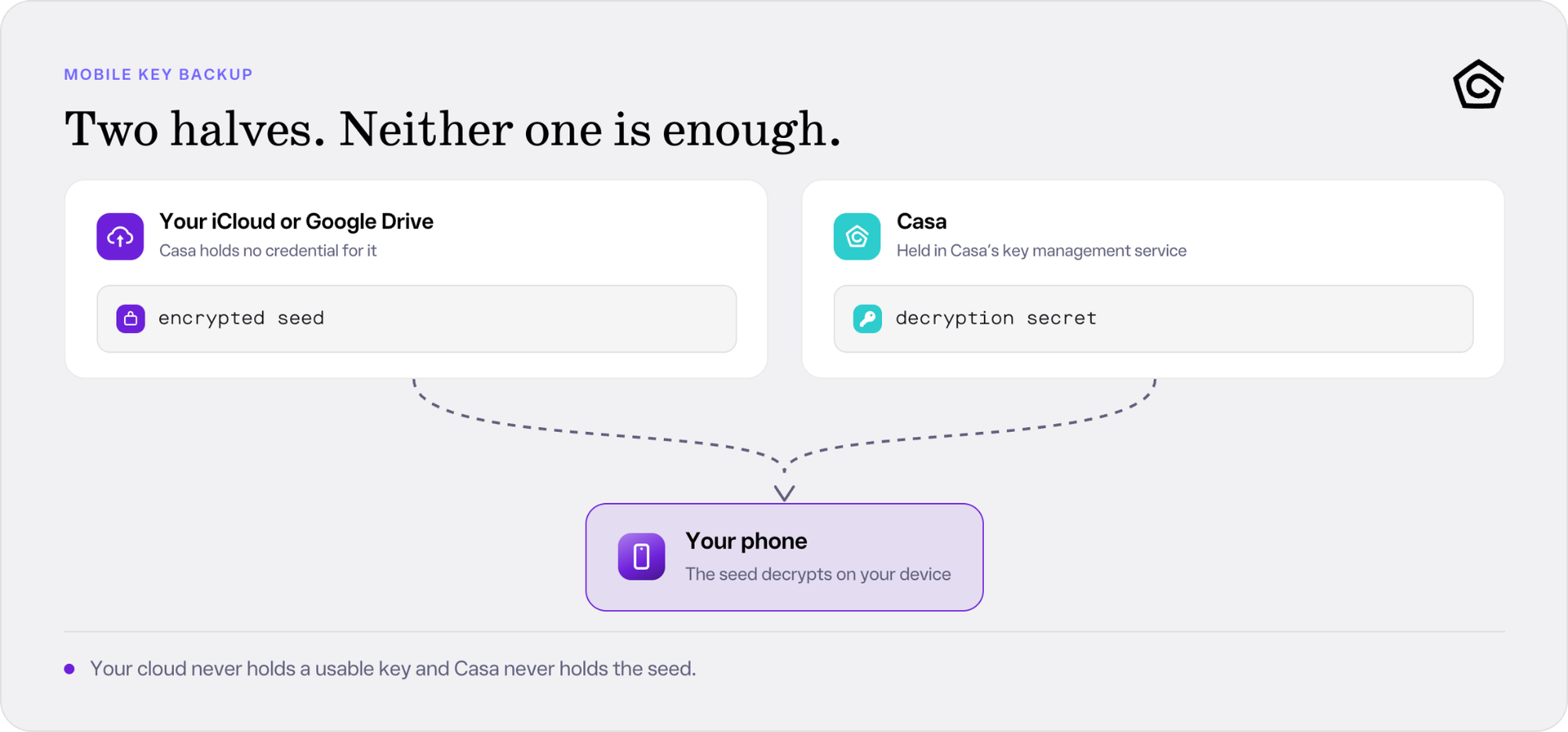
The backup splits into two pieces, and neither piece can rebuild the key by itself which means that even if your Google Drive or iCloud was compromised, your mobile key would remain secure.
Recovery brings the two together on your replacement phone. You sign in to Casa, reconnect the same cloud account, and the app downloads the encrypted backup and requests the secret over an authenticated connection. The decryption happens on your phone, and the encrypted seed never travels to Casa.
Casa's backend has no route to that encrypted backup. It holds no credential for your iCloud or Google Drive account, and nothing in the app sends the encrypted seed to Casa.
What you give up using the Mobile Key
A phone is a connected device (Bluetooth, Wi-Fi, cellular) and has the highest likelihood of being stolen, lost, or damaged, since it is a multi-use device.
When you use a Mobile Key, you trust the software that Casa wrote as well as the generation that happens on your phone. The result never leaves your phone in readable form, and the backup splits in half so that neither your cloud account nor Casa can rebuild the key alone. Of the three keys, this is the easiest to use, the easiest to pass on, and the one you should expect to replace the most often.
If you use a Casa Mobile key, you are also not locked into the Casa app. From the Mobile Key's import and export settings you can authenticate and export its 12-word seed phrase, which hands you the key itself to keep independently of Casa. Revealing those words retires that Mobile Key, so Casa marks it inactive and you replace it before signing again. Casa creates no file and keeps no copy, so any record you make of those words is yours to protect.
YubiKey
A YubiKey is a security key most people first meet as a two-factor authenticator device. With Casa, that two-factor device becomes a vault key, referred to as a cool key: the private key stays offline on the device, while generation and signing happen in a browser.
A YubiKey suits clients who want multisig without the complexity of a specialty device. Standard hardware wallets are excellent at cold storage, but they also demand more of you: cables, companion software, and firmware updates that introduce friction and break devices. A YubiKey needs none of the auxiliary hardware, never needs updating, and only requires a single tap to sign.
Anyone in your setup who is non-technical, including a family member who may one day need to sign, can operate a YubiKey.
How your YubiKey seed is generated
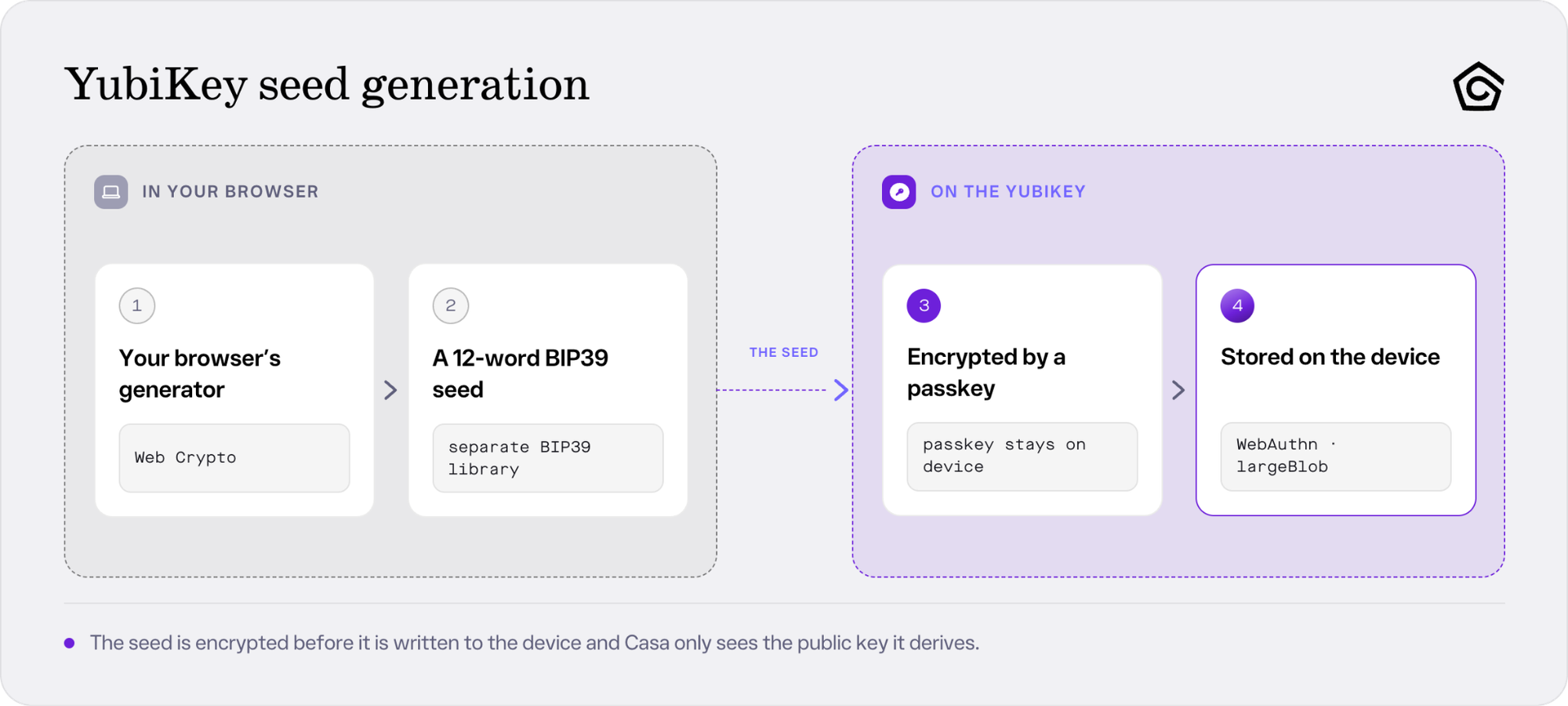
Casa's web app runs in your browser to generate the seed to your YubiKey during setup.
The app draws on the browser's Web Crypto randomness, using a BIP39 implementation separate from the one your phone uses, and produces a private key. That is a different generator, a different implementation, and a different piece of hardware from the one behind your Mobile Key.
That key is encrypted with a passkey created on the YubiKey itself. Then, the encrypted result writes into the device's large data blob storage, the WebAuthn largeBlob. Creating that credential requires user verification, so setup does not complete without a PIN set on the device. The YubiKey stores the key without generating it, and its own internal hardware random number generator plays no part.
The passkey doing that encryption never leaves the YubiKey, and is domain-specific. It signs only for Casa's own app.keys.casa domain, so a lookalike site on a different domain cannot use your credential to produce a signature.
Casa keeps no copy of that key, encrypted or otherwise.
What you need before you start using a YubiKey
Every YubiKey signing action runs through Chrome on a desktop or laptop: adding the key, health checks, and signing transactions. Neither Brave nor Chrome on your phone will work. Windows users also need Windows 11 or later.
Your YubiKey needs firmware 5.5 or higher. Yubico ships no firmware updates, so an older unit gets replaced rather than upgraded. One YubiKey also cannot hold two jobs within the Casa app, so if yours is already your passkey for logging in to Casa, a second one is required to handle your vault.
Vulnerabilities of a YubiKey
A YubiKey puts your computer inside the trust boundary. Your seed enters browser memory whenever the key releases it, which covers setup, signing, health checks, seed export, and duplication. A YubiKey protects the seed at rest and controls who gets access to it, and it does not process a transaction in isolation the way an air-gapped device does.
That computer is also the only thing showing you what you are about to sign, because a YubiKey has no screen. A hardware wallet puts the amount and destination on its own display for you to confirm against. Your PIN and your tap confirm only that a person is present and consenting, so a compromised computer could show you one transaction and ask the key to sign a different one.
The domain binding described earlier stops a lookalike site on another domain from using your credential, assumes a browser that enforces the standard correctly, and offers no defense against code running on Casa's own page.
A compromised YubiKey on its own cannot move your digital assets, and the same holds for a compromised phone or a flawed hardware device. That is the argument for holding keys on separate hardware and why Casa recommends a multi-vendor multisig vault setup.
Casa recommends doing YubiKey operations in Chrome Incognito on a computer you trust and keep updated to limit your exposure to malicious extensions. Like other hardware devices, losing the key or damaging it makes that key unusable, and PIN attempts behave the same way. Yubico documents eight tries before the FIDO2 application blocks itself. In the event of a lockup, your seed will not be exposed. Unblocking the device takes a FIDO2 reset, and that reset deletes the credential holding your encrypted seed, so the vault key gets wiped.Securing the pin on your YubiKey is an important step to ensuring that your key will be accessible and usable.
Your YubiKey's offline backup and Sovereign Recovery
The optional 12-word offline backup is the one place a YubiKey setup puts your seed phrase words on paper. The Casa app calls it Create Offline Backup, and it is what gives a YubiKey a Sovereign Recovery path: signing your own transactions with no Casa software in the loop, using Sparrow or Electrum. That backup preserves your ability to spend without Casa, though importing it onto a fresh YubiKey inside the Casa app is not supported. If you are backing up your YubiKey seedphrase, you are relying on the security of your browser and computer to not leak or expose your seedphrase when you reveal it on your browser.
Sovereign Recovery covers personal 3-key and 5-key vaults, Casa emails the public recovery information and instructions once the vault is ready, and you can request a fresh copy from Settings at any time. Your bitcoin wallet descriptor lives in the app rather than in that email, on the Deposit Funds screen, where you can view and copy it.
As a reminder, never enter or reveal your seed phrase to anyone, including someone claiming to be a Casa employee. Casa's guidance on obtaining and storing a seed phrase safely covers where to put your seedphrase once you have it.
The Casa Key
Every Casa vault includes the Casa Key. This is the only key Casa manages, and it exists to help you recover your vault if you lose a key or be a signer on transactions when you are away from your other wallets.
The Casa Key can produce a signature, but it cannot move anything with that signature alone nor initiate a transaction. A 3-key vault requires two signatures before digital assets move, so the Casa Key always needs at least one of your keys alongside it.
How your Casa Key is generated
The Casa Key sits outside the mobile and web generation paths. Casa generates and holds it offline, operationally separate from the flows that create your other keys, and limits internal access to it.
Casa's online vault service stores only Casa’s extended public key, which is what lets the key participate in your vault's multisig. The private key never goes online, so a breach of Casa's servers does not put your Casa Key in an attacker's hands.
How to access your Casa Key
The Casa Recovery Key is the only key Casa directly manages, and it exists so that losing your own keys stays recoverable.
How you authenticate depends on your membership. Standard clients answer three security questions they set when they configured the vault. Premium and Private Clients verify over a live video verification call with the Casa team.
Verification is only the first step. Standard requests carry a fixed seven-day delay before the Casa Key will sign. Premium and Private Client requests carry 2 days.
Casa emails you the moment a Casa Key signature request is created, and question-based recoveries get a countdown email until the day the Casa Key signs. Someone who got past your security questions would still have to wait out the week while your inbox notifies you. In every case, the Casa Key also has to pair with at least one of your remaining keys before any asset moves.
The Casa Key's role in inheritance
When you set up Casa Inheritance, Casa shares the Casa Key with your recipient, alongside the encrypted copy of your Mobile Key they scan from your phone. They cannot use either one, or even see your balance, until an access request has run its course. Once someone starts a claim as an inheritor, Casa sends you an email once a month for six months and only then does the vault open to them. You can revoke that access or stop a claim at any point.
You never have to depend on Casa
Two of the three keys in the default 3-key vault come from software Casa wrote: the Mobile Key and the Casa Key. If that ratio bothers you, you can change it.
The simplest alternate configuration Casa clients use is a 3-key vault with two hardware wallets and the Casa Key. In that configuration, every key you sign with was generated by a third-party manufacturer's firmware, on hardware you bought yourself; or by rolling dice and generating your own entropy, with no Casa code involved in producing the seed. Two of your own keys, from two different vendors, are enough to move your digital assets whenever you want, including moving them out of Casa entirely.
Every Casa vault has a Sovereign Recovery path, whichever configuration you choose, documented in an email Casa sends once your vault is ready. That path lets you move your own funds with your own keys, with no Casa software in the loop, with Sparrow or Electrum Wallet. Your vault exists whether or not Casa does.
Independent keys, independent paths
The three generation paths share no runtime and no random-number source. Your phone, the browser working with your YubiKey, and Casa's offline recovery environment are three different execution environments with three different trust boundaries.
A potential defect stays scoped to the key its own path produced. A bug in Mobile Key generation could weaken that Mobile Key, and it would not change your YubiKey or the Casa Key. The reverse holds too. A flaw in the browser generation path reaches that YubiKey key and no further, and a problem in the recovery process stays isolated from both the phone and the browser.
That isolation has a limit. Separate implementations on separate hardware still share common cryptographic standards like BIP39.
Diversification runs through the rest of the vault too. Your hardware keys should come from different manufacturers running different firmware, so a single vendor's defect never reaches your whole key set (known as multi-vendor multisig). By design, your vault will always require a majority of keys to sign before any of your digital assets move, so one defective, lost, or compromised key cannot move them by itself.
If you want a second read on how your own keys are set up, book a no-obligation call with a Casa security advisor.